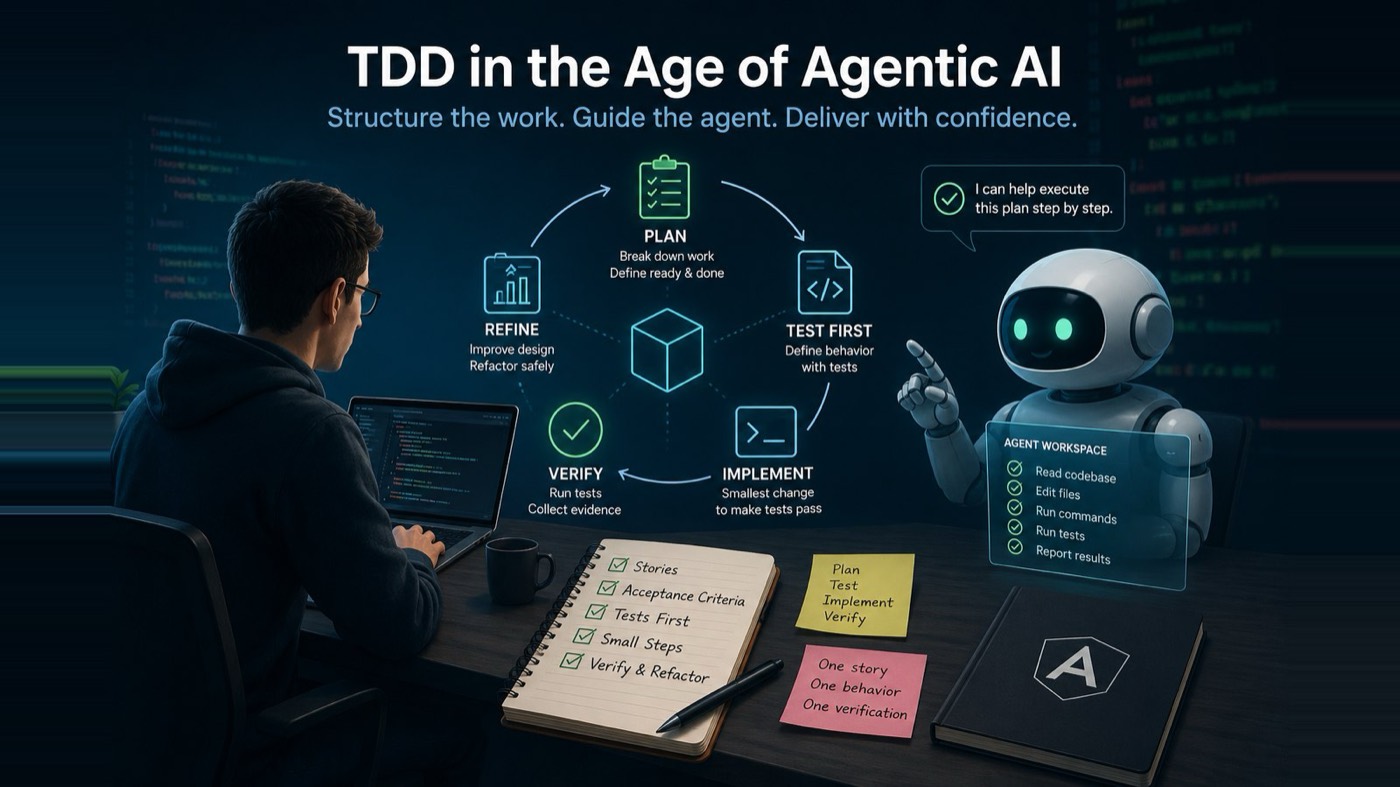
Agentic AI is changing software development, but not simply because tools like Claude Code and OpenAI Codex can generate code. Code generation is useful, but it is not the real shift.
The bigger change is that these tools can now work across a project. They can inspect files, understand parts of a codebase, edit multiple files, run commands, execute tests, iterate on failures, and prepare a summary of what changed. They are no longer only suggesting the next line of code. They are becoming active participants in the delivery process.
That is powerful.
It is also exactly why engineering discipline matters more than ever.
If you ask an agent to "build a feature," it may produce something that looks correct. It may compile. It may even pass a few obvious checks. But unless the work is planned, broken down, tested, and verified, you may not know whether the agent built what you asked for or what it inferred from an incomplete instruction.
This is where Test-Driven Development becomes important again.
Not as an old developer ritual. Not as process theatre. Not as a way to add ceremony to delivery.
In the age of agentic AI, TDD becomes a control system.
It turns intent into executable behaviour. It turns acceptance criteria into tests. It gives the agent a clear target and gives the human reviewer a practical way to verify the result.
The point is not just to generate code faster.
The point is to get closer to what you actually asked for.
AI makes speed easier. It does not make delivery safer by default.
The 2025 DORA report from Google found that AI adoption among software development professionals is already widespread, with 90% of respondents saying they use AI at work and more than 80% saying AI increased their productivity.1
That is a significant shift. AI is no longer a side experiment for many software teams. It is already part of daily development work.
But the same research also highlights the part that matters most for engineering leaders and delivery teams: AI acts as an amplifier. It can magnify the strengths of a good delivery system, but it can also expose weaknesses in the way work is planned, reviewed, tested, and operated.
GitLab's 2026 AI Accountability research points to the same tension. Based on a survey of 1,528 developers and technology buyers, GitLab reported that 80% said their organization adopted AI tools faster than it developed policies to govern them. The same research found that 92% reported governance challenges with AI-generated code, and 85% agreed that AI has shifted the bottleneck from writing code to reviewing and validating it.2
That is the practical challenge.
The bottleneck is not always code creation anymore.
The bottleneck is knowing whether the generated code is correct, safe, maintainable, and aligned with what was requested.
TDD helps because it gives AI agents something better than a broad instruction. It gives them a contract.
Start with planning, not implementation
A common failure mode is starting with implementation too early.
A developer opens Claude Code or OpenAI Codex and writes:
Create a todo app with Angular.
The agent will probably produce something. It may create components, services, templates, and tests. It may use local storage. It may add routing. It may choose a state pattern. It may also make assumptions about dependencies, structure, styling, and behaviour.
The output may not be bad.
The problem is that too many decisions were made before the work was shaped.
A better first instruction is:
Planning mode only. Do not edit files yet.
I want to create a todo app with Angular.
First, break the deliverable into small composable stories.
For each story, define the goal, acceptance criteria, Definition of Ready, Definition of Done, expected files to create or modify, dependencies, required tests, risks, assumptions, and implementation order.
Stop after the plan.
This changes the workflow.
The agent is no longer being asked to guess and generate. It is being asked to plan.
The human gets something useful to review before production code is written. That review matters because it is much cheaper to correct a plan than to untangle a large diff.
That is where agentic development becomes more controlled.
The first story should be the scaffold
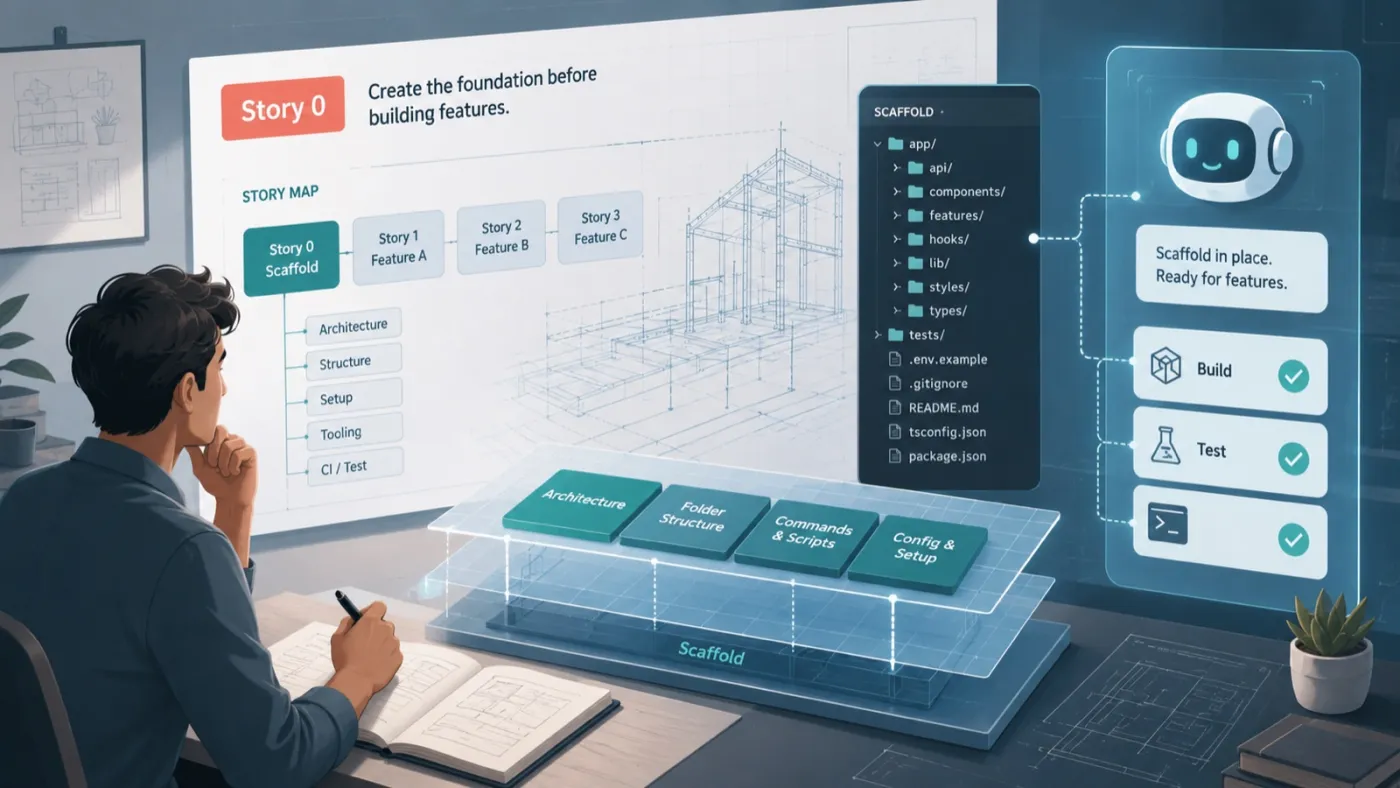
Before the agent builds todo behaviour, the first story should be the scaffold.
If the Angular project does not exist yet, the agent should not start with todo logic. It should first create the application structure, confirm the testing setup, establish folder conventions, and prove that the app can build and test successfully.
This should be Story 0.
Story 0: Create the Angular application scaffold
The goal of Story 0 is not to build todo functionality. The goal is to create the foundation that all future stories will use.
Acceptance criteria for Story 0 could be:
- Given the repository does not contain an Angular app, when the scaffold task runs, then a new Angular application is created.
- Given the Angular app is created, then the project can be installed, built, and tested successfully.
- Given the todo feature will be implemented later, then a dedicated todo feature folder exists or is clearly planned.
- Given the project uses a current Angular version, then standalone components are used unless the existing project convention says otherwise.
- Given testing is part of the workflow, then the test setup is confirmed before feature implementation starts.
- Given the scaffold is complete, then no todo business logic is implemented yet.
The scaffold story should stay intentionally simple.
That is not a lack of ambition. It is scope control.
The Definition of Ready for Story 0 might include:
- The app name is known.
- The package manager is known.
- The preferred styling approach is known.
- The Angular version or project standard is known.
- The agent knows whether this is a new app or an existing repository.
- The build and test commands are known or can be discovered.
The Definition of Done might include:
- The Angular app scaffold exists.
- The app starts locally.
- The build command passes.
- The test command passes.
- The todo feature folder is created or identified.
- No todo business logic has been implemented.
- No unnecessary dependencies have been added.
- The agent reports generated files, commands executed, and verification results.
Expected files may include:
angular.jsonpackage.jsontsconfig.jsonsrc/main.tssrc/index.htmlsrc/styles.cssorsrc/styles.scsssrc/app/app.component.tssrc/app/app.component.htmlsrc/app/app.routes.tssrc/app/todos/
Without Story 0, the agent may create the project foundation and the first feature at the same time. That usually means a bigger diff, more assumptions, and a harder review.
With Story 0, the foundation is verified first.
Then the agent can move into behaviour.
Break the todo app into small composable stories
After the scaffold, the todo app should be broken into small stories.
A useful story order could be:
- Story 0: Create the Angular application scaffold.
- Story 1: Create the todo domain model and state service.
- Story 2: Add a form to create a todo.
- Story 3: Display the todo list.
- Story 4: Toggle a todo between active and completed.
- Story 5: Delete a todo.
- Story 6: Filter todos by all, active, and completed.
- Story 7: Persist todos in local storage.
- Story 8: Add empty, validation, and error-safe UI states.
This order keeps each step small.
The scaffold gives the app a foundation. The domain model gives the app a data shape. The state service gives the app controlled behaviour. The UI stories consume that behaviour. Persistence comes later because it is a separate concern.
This is exactly the kind of decomposition that makes agents more reliable.
The agent does not need to solve the whole app at once. It solves one small, testable behaviour at a time.
That reduces ambiguity.
It also reduces review effort, because reviewing one focused change is much easier than reviewing a large AI-generated diff that mixes setup, state, UI, validation, persistence, and styling in one pass.
Acceptance criteria turn vague intent into testable behaviour
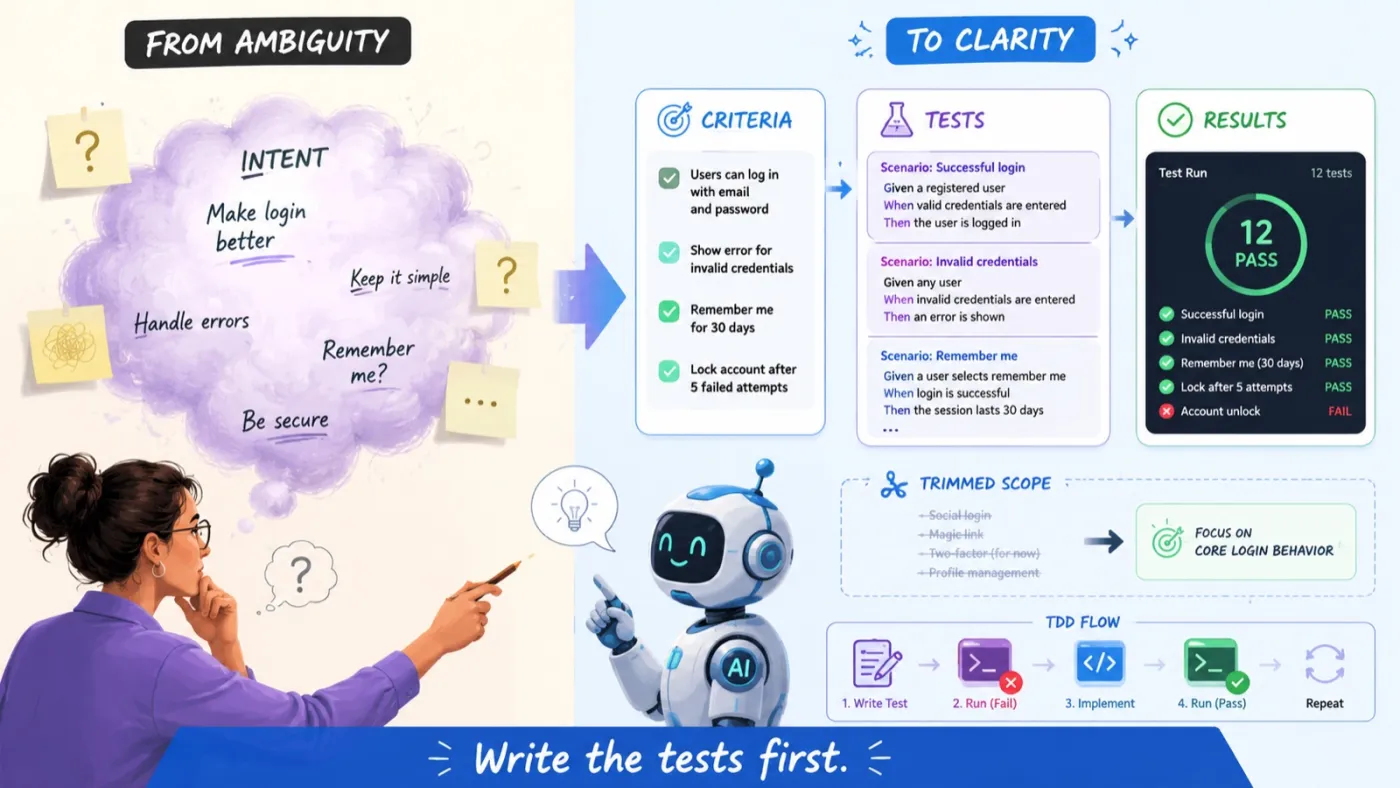
Take Story 2: Add a form to create a todo.
A weak requirement would be:
The user can add todos.
That sentence looks simple, but it leaves too much open.
- What happens when the input is empty?
- Should spaces be trimmed?
- Should the input clear after submit?
- Is a new todo active or completed by default?
- Should duplicate todos be allowed?
- Should pressing Enter submit the form?
The agent can make assumptions, but assumptions are not requirements.
Better acceptance criteria would be:
- Given the todo input is empty, when the user submits the form, then no todo is created.
- Given the todo input contains only spaces, when the user submits the form, then no todo is created.
- Given the todo input contains text, when the user submits the form, then a new todo is added to the list.
- Given the todo text has leading or trailing spaces, when the todo is created, then the stored text is trimmed.
- Given the todo is added successfully, then the input field is cleared.
- Given a todo is newly created, then it is active by default.
Now the behaviour is specific.
The agent can turn these criteria into tests before writing the implementation.
This is the core of TDD in agentic AI.
You are not asking the agent to "make a form."
You are asking the agent to prove behaviour.
Say "write the tests first"
In traditional TDD language, people often say "write a failing test."
That phrase is accurate, but it can sound strange to readers who are not already familiar with TDD. It can sound like we are asking people to write broken tests.
A clearer instruction is:
Write the tests first.
Or even better:
Define the expected behaviour with tests before implementation.
The test will fail at first because the feature does not exist yet. That is expected. The failure proves that the test is checking something real.
For the Angular todo app, before implementing addTodo, the agent could write a test like this:
it('does not add a todo when the text is empty', () => {
  const initialCount = store.todos().length

  store.addTodo('')

  expect(store.todos().length).toBe(initialCount)
})
At first, this test may fail because addTodo does not exist yet, or because the current implementation adds empty todos.
Then the agent writes the smallest amount of code needed to make the test pass:
addTodo(text: string): void {
  const trimmed = text.trim()

  if (!trimmed) {
    return
  }

  this.todos.update((todos) => [
    ...todos,
    {
      id: crypto.randomUUID(),
      text: trimmed,
      completed: false,
    },
  ])
}
The workflow is:
- Write the tests first.
- Confirm they fail for the expected reason.
- Implement the smallest change.
- Run the tests again.
- Refactor only when the tests are green.
- Report the evidence.
This gives the agent a tight feedback loop.
It also gives the human reviewer a clear path to validate the work.
Definition of Ready tells the agent when it can start
Definition of Ready is often treated as a formality. In agentic development, it becomes more practical.
The agent should not start implementing a story until the story is clear enough to execute.
For Story 2, the Definition of Ready could be:
- The Angular scaffold exists.
- The todo model exists.
- The todo state service exists.
- The add-todo behaviour is defined.
- Validation expectations are clear.
- The UI location for the input form is known.
- The testing approach is agreed.
- Persistence is out of scope for this story.
That final line is important.
If persistence is not explicitly out of scope, the agent may decide to add local storage while building the form. That may sound helpful, but it mixes responsibilities. Mixed responsibilities create larger changes. Larger changes are harder to review and harder to test.
DoR keeps the agent focused.
It defines what must be true before work begins.
Definition of Done tells the agent when to stop
Definition of Done is just as important.
For Story 2, the Definition of Done could be:
- The add-todo form is implemented.
- Empty submissions do not create todos.
- Whitespace-only submissions do not create todos.
- Valid submissions create active todos.
- Todo text is trimmed before storage.
- The input clears after successful submission.
- Unit tests cover the add-todo behaviour.
- Component tests cover the user interaction.
- Existing tests still pass.
- No unrelated files are changed.
- No unnecessary dependencies are added.
- The agent reports changed files and test results.
This prevents the agent from declaring the story complete just because code was generated.
Done means the acceptance criteria are covered.
Done means the tests pass.
Done means the build is green.
Done means the changed files make sense.
Done means there is evidence.
A summary is useful, but it is not enough by itself. The useful part is the evidence behind it: commands run, tests passed, files changed, and any risks or assumptions that remain.
Expected files protect the architecture
One of the most useful planning outputs from an agent is the expected file list.
Before implementing the todo app, the agent should say which files it expects to create or modify.
For example:
src/app/todos/todo.model.tssrc/app/todos/todo-store.service.tssrc/app/todos/todo-store.service.spec.tssrc/app/todos/add-todo-form.component.tssrc/app/todos/add-todo-form.component.htmlsrc/app/todos/add-todo-form.component.spec.tssrc/app/todos/todo-list.component.tssrc/app/todos/todo-list.component.htmlsrc/app/todos/todo-list.component.spec.tssrc/app/todos/todo-filter.type.tssrc/app/todos/todo-storage.service.tssrc/app/todos/todo-storage.service.spec.ts
The agent should also list files that should not be touched.
For example:
src/app/payment/*src/app/auth/*src/environments/*package.json, unless a dependency is explicitly approved
This gives the reviewer a scope boundary.
If the agent is implementing "delete todo" and suddenly modifies app-wide routing, authentication, or package dependencies, the reviewer can immediately challenge the change.
File scope is architectural control.
Agentic development needs that control because agents can move across files quickly.
Dependencies must be visible before implementation
The agent should also identify dependencies before coding.
For the Angular todo app, the dependency section might say:
- Angular standalone components will be used, unless the existing project standard requires otherwise.
- Angular forms will be used for input handling.
- Todo state will be managed in a dedicated service.
- Browser local storage will be used only in the persistence story.
- No backend API is required.
- No external state management library is required.
- No UI component library is required.
- No new runtime dependency is required.
This matters because agents can add tools before proving they are needed.
A todo app does not need a backend, NgRx, a database, or a UI component library by default.
It needs a model, state, UI, tests, and later local storage.
The dependency plan keeps the implementation simple.
TDD makes the agent work in a controlled loop
Once the plan is approved, the agent should implement one story at a time using TDD.
For Story 1, the prompt could be:
Implement Story 1 using TDD.
First create tests based on the approved acceptance criteria.
The todo store should start empty, add a todo, return all todos, trim todo text, reject empty todos, and create todos as active by default.
Run the tests and confirm they fail because the behaviour is not implemented yet.
Then implement the smallest code needed to pass.
Do not implement UI, local storage, filtering, or deletion in this story.
This prompt gives the agent a narrow target.
A possible test set for the todo store could include:
- The store starts with an empty todo list.
- The store adds a todo with valid text.
- The store trims todo text.
- The store does not add empty todos.
- The store does not add whitespace-only todos.
- New todos are active by default.
- A todo can be toggled to completed.
- A completed todo can be toggled back to active.
- A todo can be deleted.
- The store can return all, active, and completed todos.
Each behaviour becomes testable.
Each test becomes feedback.
Each implementation step becomes smaller.
The agent does not need to guess what "correct" means. The tests define it.
Persistence should be a separate story
Persistence is a good example of why story boundaries matter.
A todo app probably needs local storage. But it should not be implemented during the first stories.
Persistence should be Story 7.
Story 7: Persist todos in local storage
Acceptance criteria:
- Given todos exist, when the app saves state, then todos are written to local storage.
- Given saved todos exist in local storage, when the app starts, then todos are loaded into state.
- Given local storage is empty, when the app starts, then the todo list starts empty.
- Given local storage contains invalid JSON, when the app starts, then the app does not crash.
- Given a todo is added, toggled, or deleted, then the persisted state is updated.
The Definition of Ready should require:
- The todo model exists.
- The todo store exists.
- Add, toggle, delete, and filter behaviours already work.
- The storage format is agreed.
- The local storage key is defined.
The Definition of Done should require:
- A storage service is implemented.
- Storage service tests pass.
- Store integration with persistence is tested.
- Invalid local storage data does not crash the app.
- No UI behaviour changes unless explicitly required.
- No external persistence library is added.
This keeps persistence isolated.
It also makes the agent's work easier to verify.
The agent is not solving state, UI, validation, and persistence in one large change. It is implementing one responsibility with clear tests and clear evidence.
Claude Code and OpenAI Codex fit this pattern well
Claude Code is designed as an agentic coding tool that can understand a codebase, edit files, run commands, and work through development tasks from natural language instructions.3
OpenAI Codex is designed as a software engineering agent that can work in isolated environments, edit code, run checks, validate work, and show changed-file diffs.4
That makes both tools suitable for this workflow.
But their capability is exactly why the workflow needs structure.
The pattern should not be:
Build the todo app.
The pattern should be:
- Plan first.
- Create or verify the scaffold.
- Break the work into small stories.
- Define acceptance criteria.
- Define DoR and DoD.
- Identify files and dependencies.
- Write the tests first.
- Implement the smallest passing code.
- Run verification.
- Report evidence.
- Repeat story by story.
That is how you get controlled progress instead of uncontrolled generation.
A reusable prompt for the Angular todo app
Here is a practical prompt you can use with Claude Code or OpenAI Codex:
Planning mode only. Do not edit files.
Inspect this Angular project and create a delivery plan for a todo app.
Break the deliverable into small composable stories. The first story must be Story 0: Create or verify the Angular application scaffold.
For each story, provide:
- Goal
- Acceptance criteria
- Definition of Ready
- Definition of Done
- Expected files to create or modify
- Files that should not be touched
- Dependencies
- Required tests
- Risks and assumptions
- Suggested implementation order
The todo app should support adding todos, displaying todos, toggling completion, deleting todos, filtering by all, active, and completed, and persisting todos to local storage.
Do not generate production code yet. Stop after the plan.
Then, after reviewing the plan:
Implement Story 0 only.
Create or verify the Angular scaffold.
Confirm the app builds and tests successfully.
Create or identify the todo feature folder, but do not implement todo business logic yet.
Do not add unnecessary dependencies.
Report changed files, commands run, and verification results.
Then for the next story:
Implement Story 1 using TDD.
First write tests based on the approved acceptance criteria.
Run them and confirm they fail because the behaviour is not implemented yet.
Then implement the smallest code needed to pass.
Do not implement UI, persistence, filtering, or deletion in this story.
Run the relevant test suite, linting, and type checks.
Provide changed files and verification evidence.
This is the pattern:
One story. One behaviour. One test set. One implementation. One verification report.
Then repeat.
Why this gets closer to what you asked for
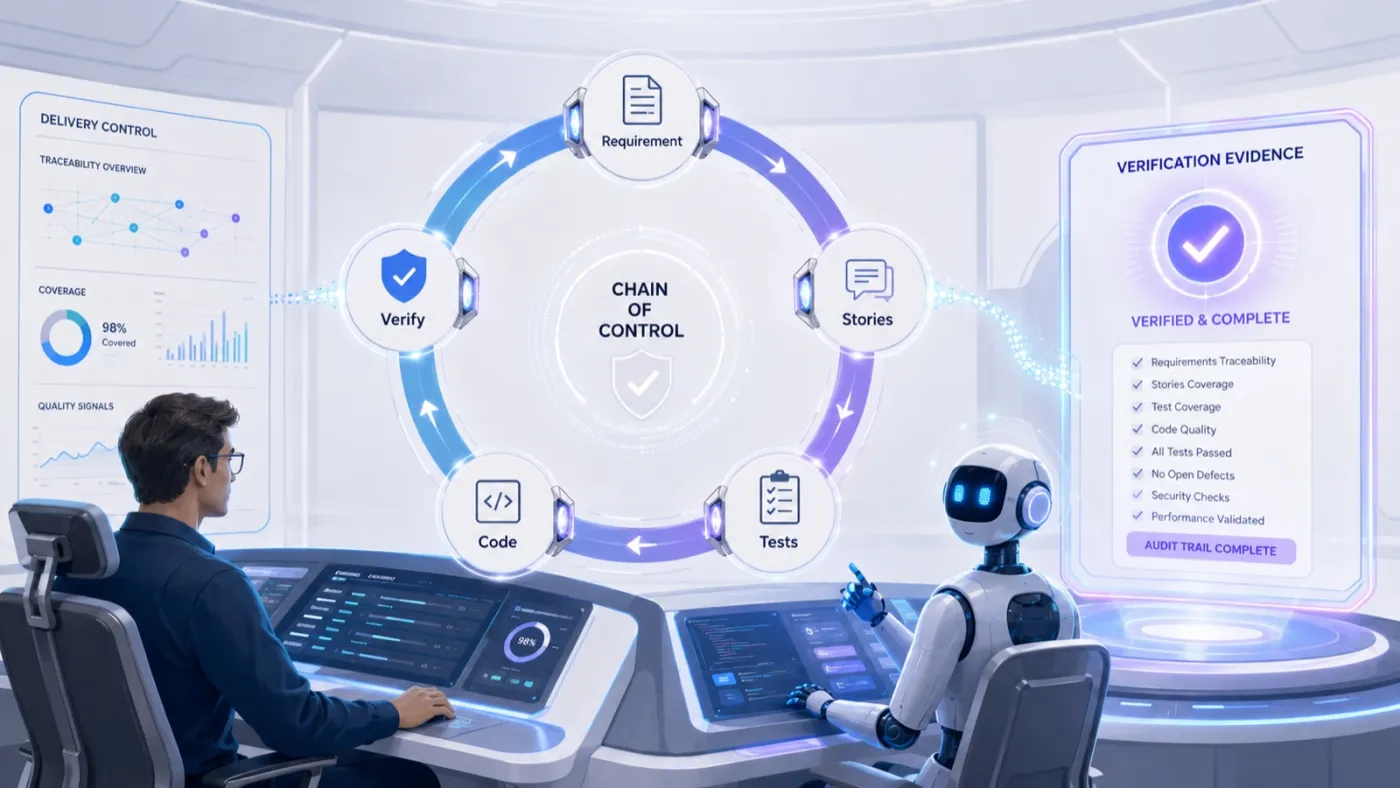
The value of this approach is the chain of control.
- The requirement becomes stories.
- Stories become acceptance criteria.
- Acceptance criteria become tests.
- Tests drive implementation.
- Definition of Ready controls when the agent can start.
- Definition of Done controls when the agent can stop.
- Expected files control scope.
- Dependencies control unnecessary complexity.
- Verification evidence controls false confidence.
This does not guarantee perfection. No workflow does.
Its value is that it reduces ambiguity, makes the work easier to inspect, and gives both the agent and the reviewer a clearer definition of correctness.
It reduces guessing.
It reduces rework.
It reduces review fatigue.
It makes the output measurable.
It gives the agent a better way to work.
Most importantly, it gives the human reviewer a better way to stay in control.
The conclusion
Agentic AI does not remove the need for engineering discipline.
It makes that discipline more important.
A simple Angular todo app shows the larger pattern clearly. Start with the scaffold. Break the work into small stories. Define acceptance criteria. Define DoR and DoD. Identify files and dependencies. Write the tests first. Then let the agent implement only what the tests prove.
That is the role of TDD in the age of agentic AI.
It is not only a testing technique.
It is a way to turn vague intent into controlled delivery.
It defines what correct means before the code exists.
And in a world where agents can generate code faster than teams can comfortably review it, that difference matters.
Footnotes
-
Google Cloud, "2025 DORA Report: State of AI-assisted Software Development", 2025. Based on responses from nearly 5,000 technology professionals worldwide. ↩
-
GitLab, "GitLab Research Reveals Organizations Are Generating AI Code Faster Than They Can Control It", 2026. States the 80%, 92%, and 85% findings, from a survey of 1,528 developers and technology buyers across six countries, conducted by The Harris Poll. ↩
-
Anthropic, "Claude Code overview": "an agentic coding tool that reads your codebase, edits files, runs commands, and integrates with your development tools." ↩
-
OpenAI, "Introducing Codex", 2025. Describes Codex as a cloud-based software engineering agent that runs each task in its own sandbox and proposes pull requests for review. ↩